Ergotron LX Pro Monitor Arm Review: The New King of Home Office Monitor Arms?
Ergotron refined their legendary LX arm into something better in almost every way. Here's a full breakdown of what changed, what didn't, and whether it's worth the price.
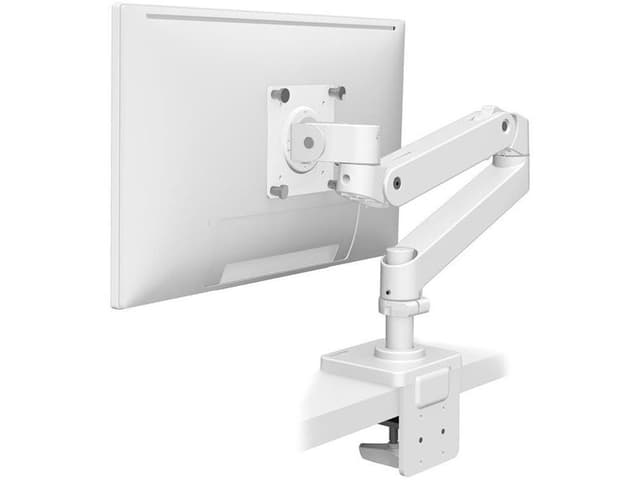
Ergotron LX Pro Premium Monitor Arm (White)
The best monitor arm for most home offices — refined, elegant, and built to last.
Our Rating
Reviewed by Sam Whitfield • May 27, 2026
Overall Score
What We Like
- ✓Near tool-free installation with hand-grip clamp and thumb screws
- ✓Improved integrated cable management with secure detachable cladding
- ✓Color-matched white VESA bracket (fixed in LX Pro vs. old black bracket on white LX)
- ✓More compact, modern base design vs. original LX
- ✓85° tilt and full 360° rotation for any viewing angle
- ✓10-year Ergotron warranty
What Could Improve
- ✗Slightly lower weight capacity than original LX (22 lbs vs. 25 lbs)
- ✗Standard pole is shorter than LX — tall pole version costs ~$80 more
- ✗Cable channels are narrow — won't accommodate many thick cables
- ✗Grommet mount sold separately
Our Verdict
The Ergotron LX Pro is the best monitor arm for most home offices at its price point. It improves on the already-excellent LX with a more compact base, tools-light installation, better cable management, and a cohesive white colorway. The 10-year warranty, 85° tilt, 360° rotation, and rock-solid stability make it an easy recommendation for anyone spending serious time at a desk. The slight reduction in max weight capacity and shorter default pole are real trade-offs, but they won't matter for the majority of users. At ~$209, it's exceptional value.
Design & Build Quality
The LX Pro is a meaningful visual upgrade over its predecessor. Ergotron replaced the older industrial aesthetic with a more cohesive design across the base, arm segments, and VESA bracket — exposed bolts are less prominent, and the pivot mechanism is more refined. The white colorway now ships with a matching white VESA bracket, which the older LX notably did not offer. The base footprint is smaller, which directly translates to more usable desk space. Construction is full-weight aluminum with the kind of rigidity you'd expect from a brand that's been engineering this since 1982.
Installation & Ease of Use
Setup is unusually straightforward for a monitor arm at this price. The desk clamp uses a large, comfortable hand grip instead of requiring an Allen key — and thumb screws are included for attaching the VESA bracket. In practice, you can mount the arm and hang your monitor without reaching for a screwdriver at all. Fine-tuning the lift tension for heavier monitors does require a quick Allen key adjustment, but it's a 60-second job. The standard pole fits desks 0.4 to 2.4 inches thick; grommet mounting is available as a separately purchased accessory.
Adjustability & Ergonomics
The LX Pro delivers 13 inches of lift, placing the monitor up to 18.3 inches above your worksurface, 85 degrees of tilt, and full 360-degree rotation — enough to go portrait mode or share your screen with someone beside you. Two fully articulating pivot joints let you position the arm in nearly any configuration. Once tension is properly set, the arm holds position without drift. For standing desk users who switch heights frequently throughout the day, this consistency is critical.
Cable Management
Cable management is one of the LX Pro's standout improvements. Cables route through channels running along the underside of both arm segments, secured by detachable cladding that doesn't require tools to open or close. It's cleaner than most competing arms. The main limitation is channel width — thick cables or running more than two or three cables will be a tight fit. For the average single-monitor setup with a power and display cable, it's excellent.
Who Should Buy This?
The LX Pro is ideal for remote workers, developers, designers, and anyone with a single monitor up to 34 inches who wants a professional-grade arm that will last a decade. If you're running a standing desk, the standard pole gives enough height range for most people — though taller users or those with very high standing positions may want to budget for the tall pole variant (~$80 more). If your monitor weighs over 22 lbs, the older Ergotron LX or the heavier-duty HX arm are better fits.
Key Specifications
Ready to Buy?
Get the best price on Amazon with free shipping for Prime members.
Check Price on AmazonCommon Questions About Ergotron LX Pro Premium Monitor Arm (White)
The LX Pro is Ergotron's current flagship desk arm, replacing the original LX as their primary recommendation. Key improvements include a more compact base, tools-light installation (hand-grip clamp + thumb screws), improved cable management with secure cladding, and a color-matched VESA bracket for the white version. The trade-offs are a slightly lower max weight capacity (22 lbs vs. 25 lbs) and a shorter standard pole. For most home office users, the LX Pro is the better buy.