UGREEN Revodok Max 213 Review: The Best-Built Thunderbolt 4 Dock You Can Buy?
UGREEN's flagship Thunderbolt 4 dock is a metal behemoth with 13 ports, 2.5GbE, SD 4.0, and flawless stability. But does it justify the price against CalDigit and Plugable? We break it all down.
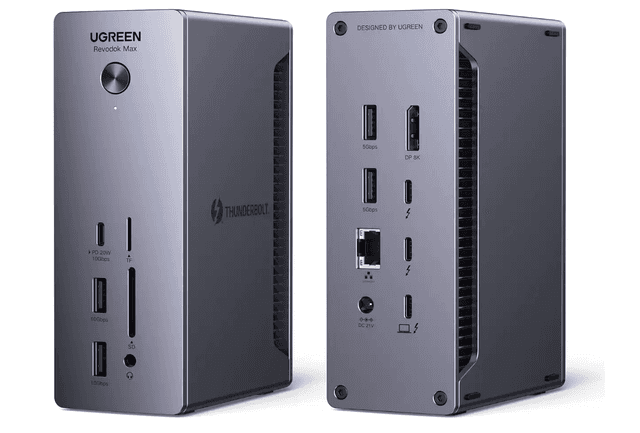
UGREEN Revodok Max 213 Thunderbolt 4 Dock (13-in-1)
Premium 13-in-1 Thunderbolt 4 dock with 40Gbps, dual 4K, 90W charging, and 2.5GbE — in a tank-like metal build.
Our Rating
Reviewed by Priya Mehta • July 14, 2024
Overall Score
What We Like
- ✓Full Thunderbolt 4 certified at 40Gbps — works with TB3, TB4, and USB4 hosts
- ✓Dual 4K@60Hz display output (Windows) or single 8K@30Hz via TB4 + DisplayPort 1.4
- ✓90W host charging + additional 20W USB-C downstream charging
- ✓2.5GbE Ethernet — far faster than the 1GbE on most competing docks
- ✓SD and microSD 4.0 card slots — significantly faster than UHS-I slots
- ✓Dual-orientation design: stands vertically or lies flat with rubber feet on both sides
- ✓All-metal chassis with excellent passive thermal management — cool to the touch even under load
- ✓No flickering or connection instability reported across multiple reviewer units
What Could Improve
- ✗Does not work with Chromebooks — TB4 only, no USB-C fallback mode
- ✗Apple M1/M2/M3 base chip MacBooks limited to single 4K display (Apple hardware limitation)
- ✗Port labels can be hard to read against the brushed metal finish
- ✗Bulkier and heavier than competing docks — significant desk footprint
- ✗Requires external 180W power brick — adds cable to the setup
- ✗No HDMI port — video output is via TB4 downstream or DisplayPort 1.4 only
- ✗Price has historically been high relative to competing TB4 docks
Our Verdict
The UGREEN Revodok Max 213 is one of the best-built Thunderbolt 4 docks available. Its all-metal chassis, dual-orientation design, rock-solid 40Gbps performance, 2.5GbE Ethernet, and SD 4.0 card slots put it ahead of most competitors on paper. In daily use, it simply works — no flickering, no instability, no surprises. The main friction points are the price (which has come down significantly since launch), the lack of HDMI, and no Chromebook support. For MacBook Pro, MacBook Air Pro/Max, Surface Pro, or Windows TB4 laptop users who want a single-cable workstation that lasts a decade, this is a near-ideal choice.
Build Quality & Design
The Revodok Max 213 is unusually heavy for a dock — and that's a compliment. The all-metal chassis feels like it could survive a drop that would destroy most plastic rivals. Reviewers from Android Central, TechRadar, and Windows Central all highlighted the build quality as a standout. The dual-orientation design is a practical touch: rubber feet on both the bottom and one side let you stand the dock vertically to save desk space, or lay it flat — and it stays put in either configuration. Port labels are well-placed, though they can be hard to read at a glance against the brushed metal finish.
Performance — Thunderbolt 4 & Data Speeds
Thunderbolt 4 certification ensures genuine 40Gbps bandwidth shared across all connected devices. Tech Advisor measured read speeds of up to 2,626MBps from a Thunderbolt 3 SSD connected through the dock — essentially line-rate performance with no bottleneck. USB4 drive performance was only marginally lower than direct host connection. The 2.5GbE Ethernet port delivered consistent line-rate speeds in all tests. No reviewer reported flickering, dropped connections, or stability issues across extended daily use.
Display Output & Mac Limitations
Windows users and Mac Pro/Max chip users can drive dual 4K monitors at 60Hz simultaneously via the two Thunderbolt 4 downstream ports and the dedicated DisplayPort 1.4. Single 8K@30Hz is also supported on Windows. The dock has no HDMI port — all video output is Thunderbolt 4 or DisplayPort, which suits Apple Studio Display and Pro Display XDR users natively, but Windows HDMI monitor users will need an adapter. Critically, base-chip Apple M1, M2, and M3 MacBooks are limited to a single external display by Apple's own hardware — this is not a dock limitation.
Charging & Power
The Thunderbolt 4 upstream port delivers 90W to the connected host laptop — enough to charge a MacBook Pro 14-inch or most Windows ultrabooks at full speed during use. A USB-C 3.2 downstream port adds 20W for charging phones or tablets simultaneously. The 180W external power brick is required for full operation; it's a sizable brick but necessary to power all ports and charge devices simultaneously. The metal chassis acts as a passive heatsink — multiple reviewers noted the dock stays cool to the touch even under full load.
Who Should Buy This?
The Revodok Max 213 is ideal for MacBook Pro (M1 Pro/Max or newer), MacBook Air (with M-series Pro/Max chip), Surface Pro, or Windows Thunderbolt 4 laptop users who want a single-cable workstation. The 2.5GbE Ethernet makes it particularly attractive for power users who run NAS drives or need consistent high-bandwidth LAN. It is not compatible with Chromebooks. If you only need basic USB-C connectivity and your laptop lacks Thunderbolt, this is overkill — but for the right host machine, it's as close to a perfect dock as exists at its price.
Key Specifications
Ready to Buy?
Get the best price on Amazon with free shipping for Prime members.
Check Price on AmazonCommon Questions About UGREEN Revodok Max 213 Thunderbolt 4 Dock (13-in-1)
It depends on your MacBook chip. MacBook Pro and MacBook Air models with M1 Pro, M1 Max, M2 Pro, M2 Max, M3 Pro, M3 Max, or Intel chips can run dual 4K@60Hz displays through the dock. Base M1, M2, and M3 MacBook Air and MacBook Pro models are hardware-limited by Apple to a single external display regardless of which dock you use — this is an Apple chip limitation, not a dock flaw. Windows laptops with Thunderbolt 4 can drive dual 4K@60Hz or single 8K@30Hz with no restrictions.